Bill.com
Get working capital funding through Bill.com integration. Founderpath analyzes your accounts payable data, vendor payments, and expense patterns to provide non-dilutive financing for growing businesses.



- Access
- Read-only
- What we read
- MRR · churn · retention
- Time to offer
- 24-48 hours
- Equity taken
- None
- Connections
- 29
Accounts Payable Data That Proves Operational Discipline
Your Bill.com account tells a story that bank statements can't: how you manage vendor relationships, when you pay invoices, how predictable your expenses are, and whether your operations run smoothly. Founderpath uses this accounts payable intelligence to assess business health and provide working capital financing.
Why Bill.com Data Matters for Funding
Traditional lenders look at revenue and credit scores. We look deeper—at the operational signals that show whether a business is well-run:
Payment Discipline
- Do you pay vendors on time, or is AP aging a problem?
- Are payments predictable or erratic?
- How efficient is your invoice-to-payment cycle?
Expense Patterns
- Are expenses stable and predictable, or volatile?
- Is spending aligned with revenue cycles?
- Are there expense categories growing faster than others?
Vendor Relationships
- Are you dependent on a few critical vendors, or diversified?
- Do you have stable, long-term vendor relationships?
- Are there patterns suggesting operational issues?
Cash Flow Predictability
- Can we forecast your cash needs accurately?
- Are there seasonal patterns or one-time spikes?
- How much working capital runway do you need?
What Bill.com Integration Reveals
When you connect Bill.com, we analyze your accounts payable data to build a picture of operational health:
AP Aging Analysis
- Current vs. 30/60/90-day aging buckets
- Trends in payment timing over time
- Comparison to industry benchmarks
Expense Categorization
- Breakdown by vendor type and expense category
- Recurring vs. one-time expense identification
- Expense growth trends and trajectory
Payment Velocity
- Average days payable outstanding (DPO)
- Invoice-to-payment cycle time
- Payment approval workflow efficiency
Vendor Concentration
- Revenue distribution across vendors
- Critical vendor dependency analysis
- Supply chain risk assessment
How Bill.com Integration Works
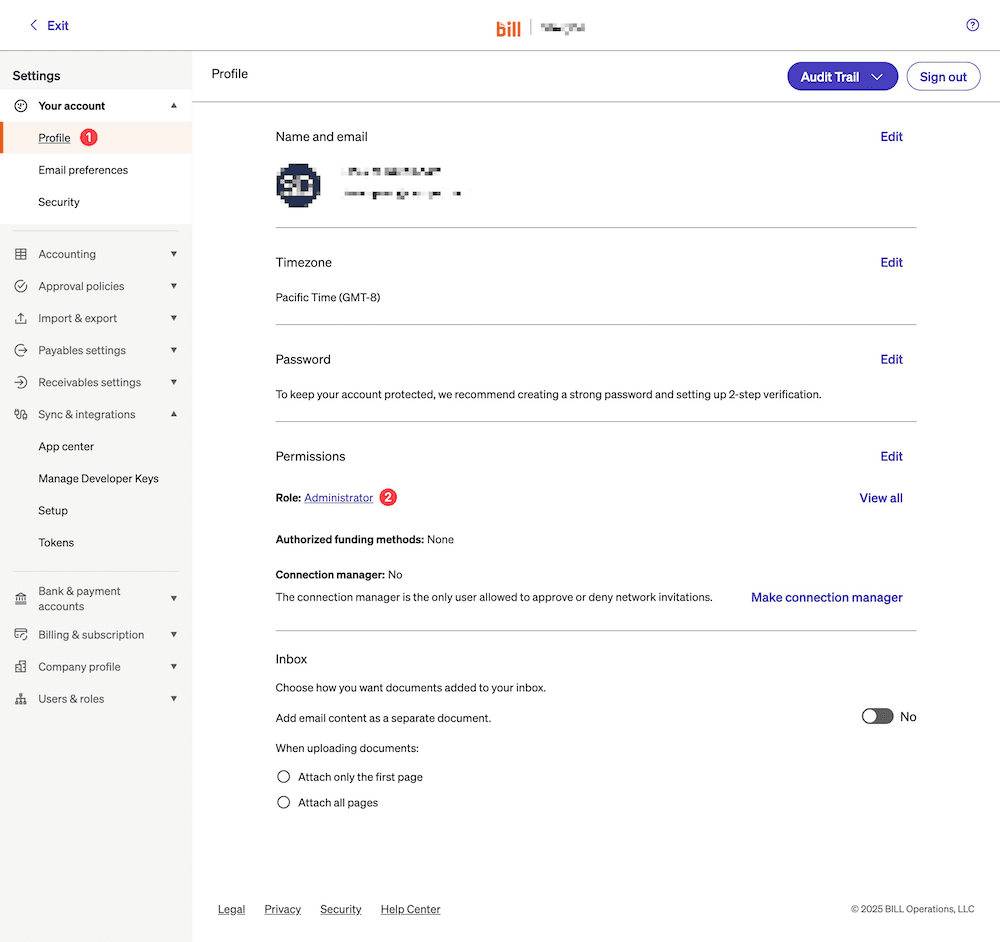
Step 1: Verify Administrator Access
Go to Settings > Profile in Bill.com and confirm you have Administrator role access.
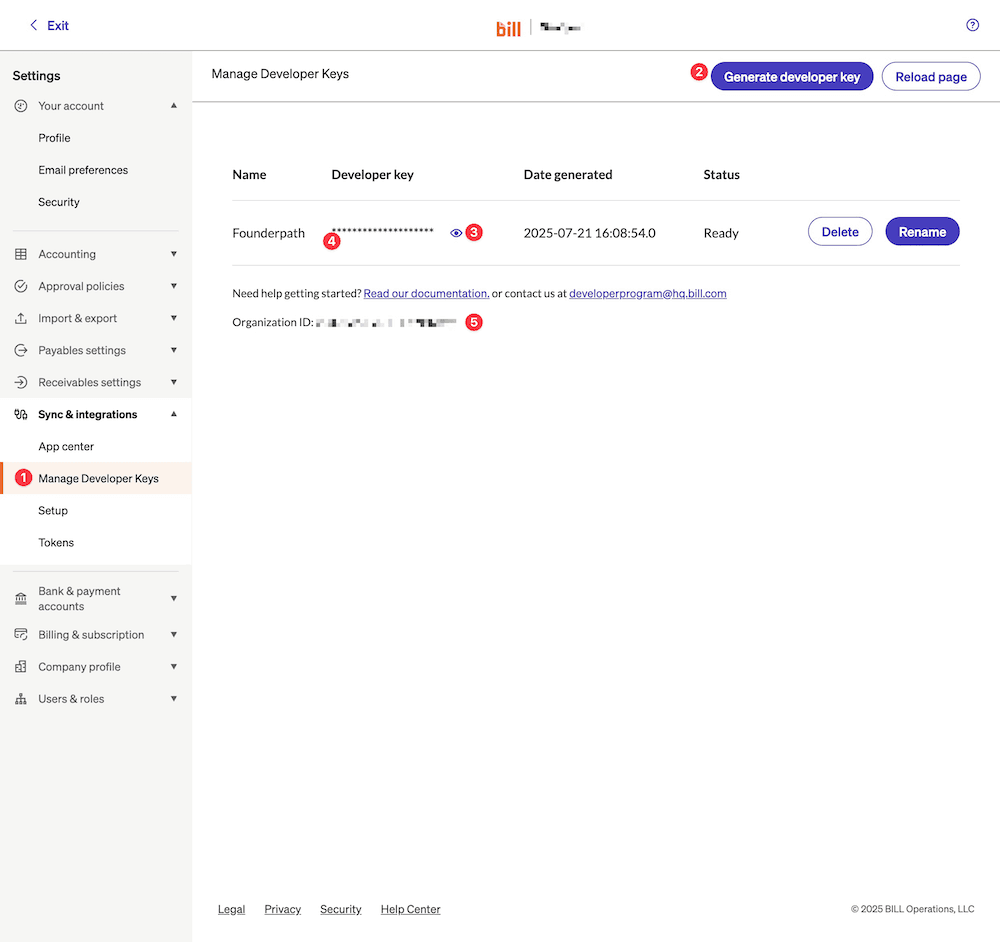
Step 2: Generate Developer Key
Navigate to Settings > Manage Developer Keys and generate a key. Copy both the Developer Key and Organization ID.
Step 3: Connect to Founderpath
Enter your credentials in the Founderpath dashboard. You can use either token authentication or username/password authentication depending on your Bill.com account permissions.
Step 4: Review Your Expense Analytics
Once connected, you'll see your AP aging, payment patterns, and expense analytics. We'll use this data to generate a funding offer, typically within 24-48 hours.
Who Benefits from Bill.com Integration?
Service Businesses
If your primary expenses are contractor payments, software subscriptions, and operational costs managed through Bill.com, this integration shows us your expense discipline and cash flow needs.
E-commerce & Product Companies
Inventory purchases, fulfillment costs, and supplier payments through Bill.com reveal your supply chain efficiency and working capital requirements.
SaaS Companies with Significant OpEx
Even if you have subscription revenue through Stripe, connecting Bill.com adds context about your expense management and burn rate.
Agencies & Professional Services
Project-based expenses, contractor payments, and client cost management through Bill.com demonstrate operational maturity.
Bill.com + Revenue Data = Complete Picture
Bill.com alone shows the expense side of your business. Combined with revenue data from Stripe, QuickBooks, or bank connections, we see the full financial picture:
- Revenue trajectory (from billing or bank)
- Expense discipline (from Bill.com)
- Net cash flow (from combining both)
This comprehensive view enables better funding decisions and often better terms than relying on a single data source.
Beyond Funding: Expense Intelligence
Even if you're not ready for funding, connecting Bill.com gives you insights into your operational efficiency:
- Payment optimization: Are you taking advantage of early payment discounts?
- Vendor analysis: Which vendors represent concentration risk?
- Expense trends: Where is spending growing, and is it aligned with growth?
- Cash flow forecasting: How predictable are your cash needs?
Bill.com Integration FAQ
Verify Administrator Role
Generate Developer Key
Choose Authentication Method
Some accounts may not have access to token creation. If that's the case, use username/password authentication instead.
- AP aging: How quickly you pay invoices and whether aging is improving or worsening
- Payment patterns: Timing consistency and predictability of your payments
- Expense categories: Breakdown of spending by type and vendor
- Vendor concentration: Whether expenses are diversified or concentrated
- Cash flow signals: Predictability of your cash needs based on payment history
- Low AP aging: Most invoices paid within terms
- Consistent timing: Predictable payment patterns, not erratic spikes
- No delinquencies: Few or no severely overdue invoices
- Revenue growth and stability from billing data
- Expense discipline and patterns from Bill.com
- Net cash flow trajectory from combining both
- Capture: arrives by email, upload, or accounting sync; key fields are read off the document
- Code: assigned to the right general-ledger account, vendor, and department
- Approve: routed through an approval chain you define, in order, with a record of who signed off and when
- Pay & sync: payout scheduled, then written back to your accounting system
Bill.com is not itself a bank. It holds and moves funds through partner financial institutions, which is why a payment leaves your account and reaches your vendor under a Bill.com descriptor rather than your own. Founderpath needs none of that money movement — our connection is read-only and cannot initiate a payment.
Turn Your Bill.com Data Into Working Capital
Expense discipline unlocks funding.
Connect your Bill.com account to get a funding offer based on your accounts payable patterns and expense management. Combined with revenue data, you'll get a complete financial assessment. No credit checks, no personal guarantees.
- Operational discipline assessment
- Your AP patterns and payment timing reveal how well-run your business is. That matters for funding.
- Expense intelligence
- See your spending breakdown, vendor concentration, and cash flow predictability in one dashboard.
- Combined with revenue data
- Connect Bill.com alongside Stripe or QuickBooks for a complete financial picture and better terms.
- 24-48 hour decisions
- Automated AP analysis means you get a funding offer in days, not weeks.
- No dilution, no revenue share
- Structured financing with fixed repayment. Keep 100% of your equity and revenue.
Connect more of your stack for a stronger offer.

Stripe
Integrate Founderpath with Stripe for automated revenue tracking, subscription analytics, and payment insights.

CSV Customer List
Upload customer lists via CSV to Founderpath for subscription tracking and revenue analysis.

Chargebee
Integrate Founderpath with Chargebee for subscription billing analytics and revenue insights.

ProfitWell
Connect ProfitWell to Founderpath for subscription metrics and revenue analytics.

Recurly
Integrate Recurly with Founderpath for subscription billing and recurring revenue analytics.

Paddle
Connect Paddle to Founderpath for subscription commerce analytics and revenue insights.